


What if code wasn't a text document?
You're looking at code, but it doesn't look like code.
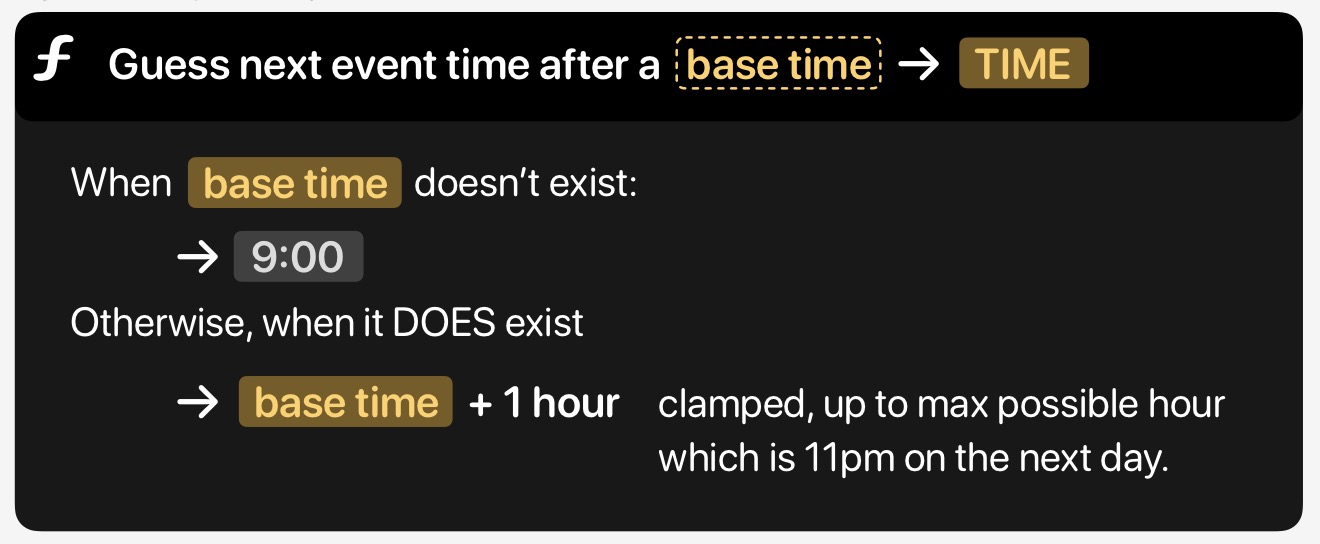
Functions are named in plain English - forget snake_case, camelCase, PascalCase. A function is just called what it does: "Add two vectors." You can expand it to read an English explanation of what it does, and the functions it calls appear as linked pills that you can expand to explore further. There's real code underneath - you can drill down to it when you need to - but the idea is that most of the time, you shouldn't have to.
This is a prototype I've been playing with. I've reached the point where taking it further would mean a serious time investment, and I have other priorities, so I'm putting it on ice for now. I'm not releasing it, but that's exactly why I'm writing about it today - I've been thinking about this stuff for about twenty years, and if I'm not going to build it into something real, I'd at least like to get my thoughts down.
Will we be hand-writing code at all in 5 years?
How we write code is changing. How far and how fast depends on who you ask - it varies wildly by programmer, by project, by the day - but the direction is clear. AI is increasingly writing the nuts and bolts of line-by-line code. It ranges from "vibe coding," where the programmer theoretically isn't looking at the code at all, to getting the AI to write small snippets that accelerate what you'd write yourself, and everything in between.
What seems clear to me is that pure vibe coding can often work for small toy projects, but at any real scale the programmer loses oversight, and things turn into a jumbled confused mess. It becomes impossible to refactor because what prompt could you possibly give the AI if you don't understand what the problem even is? So it's critical to keep an eye on what the LLM is building, how it's architected, so it fits with your vision of where your project is going.
Either way, the programmer is moving into a code architect position - thinking about structure and architecture more than the nitty gritty details - and for me this has always been both the hardest and most interesting part of the job. If you need to read and understand an LLM's code, it helps to have tools that support understanding architecture from the top down, rather than tools built around editing text files line by line, where functionality is scattered somewhat arbitrarily across files.
Twenty years of noodling
I've been interested in this stuff for a long time. As far back as around 2005, I can distinctly remember opening up Photoshop while I was on my lunch break at Rare, and I drew something that looked remarkably like Scratch. Turns out Scratch was invented before that so I can't claim any originality, but I was thinking along similar lines!
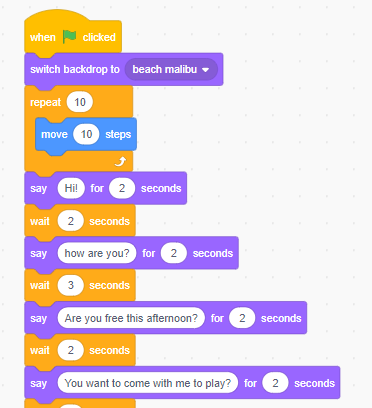
Programming in Scratch using blocks
Scratch is interesting because it provides a contained, visual object-based programming model. But it's not visually dense and it's very slow to author. That makes it fantastic as a learning tool for children, and bad if you want to be really productive.
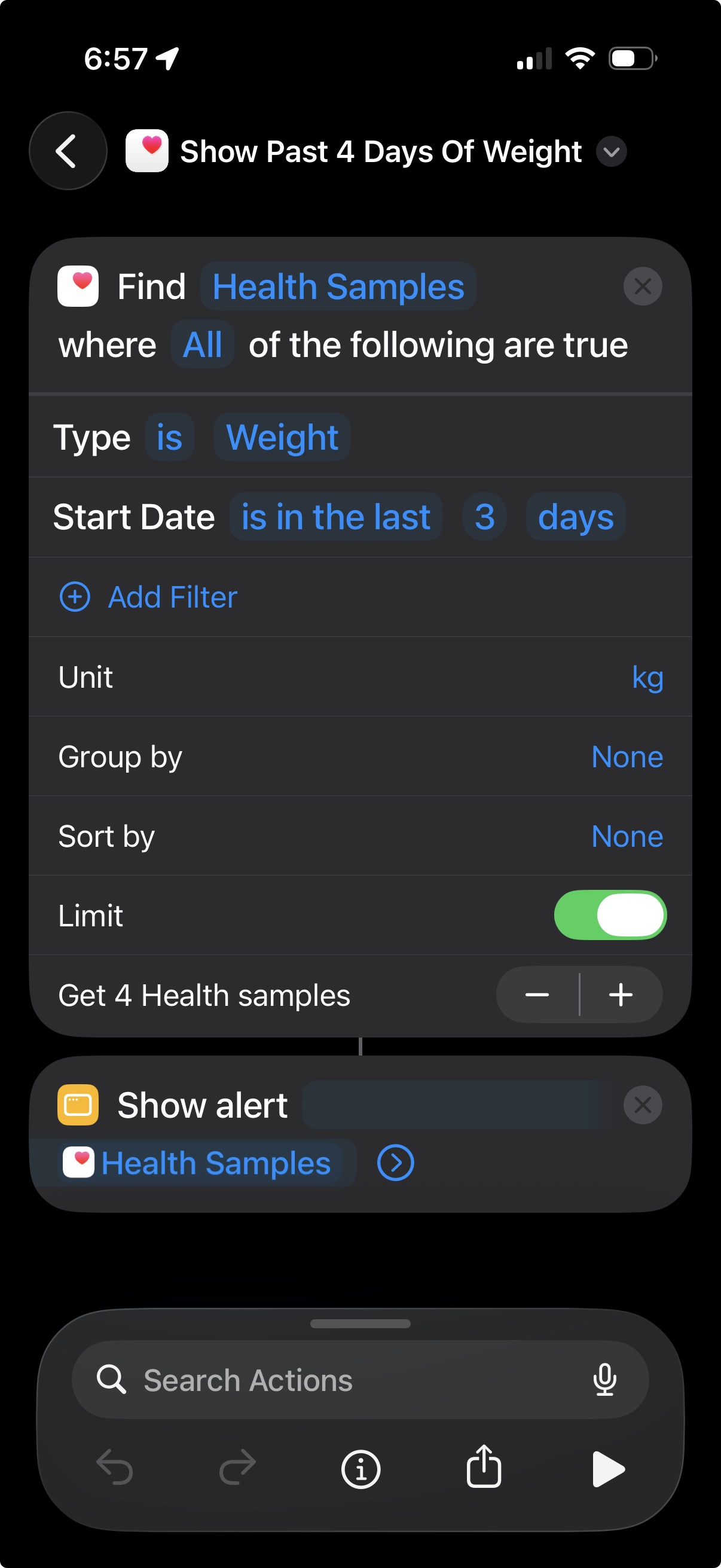
Editing in Shortcuts on iPhone
Apple's Shortcuts sits on a similar axis - ostensibly accessible for non-technical users, but with a steep learning curve despite that. Simple concepts like conditionals and loops are extremely cumbersome, "functions" don't really exist (you create shortcuts that call shortcuts), and they're really slow to activate. People have done powerful stuff with them, and I'd assume it's made logic programming more accessible to non-programmers. But it's extremely easy to hit the limitations. It feels telling that nowadays, I can't imagine something like Shortcuts being created nowadays - I'd expect it would be replaced by some kind of consumer-facing vibe coding app with a friendly block-based visualisation of the output.
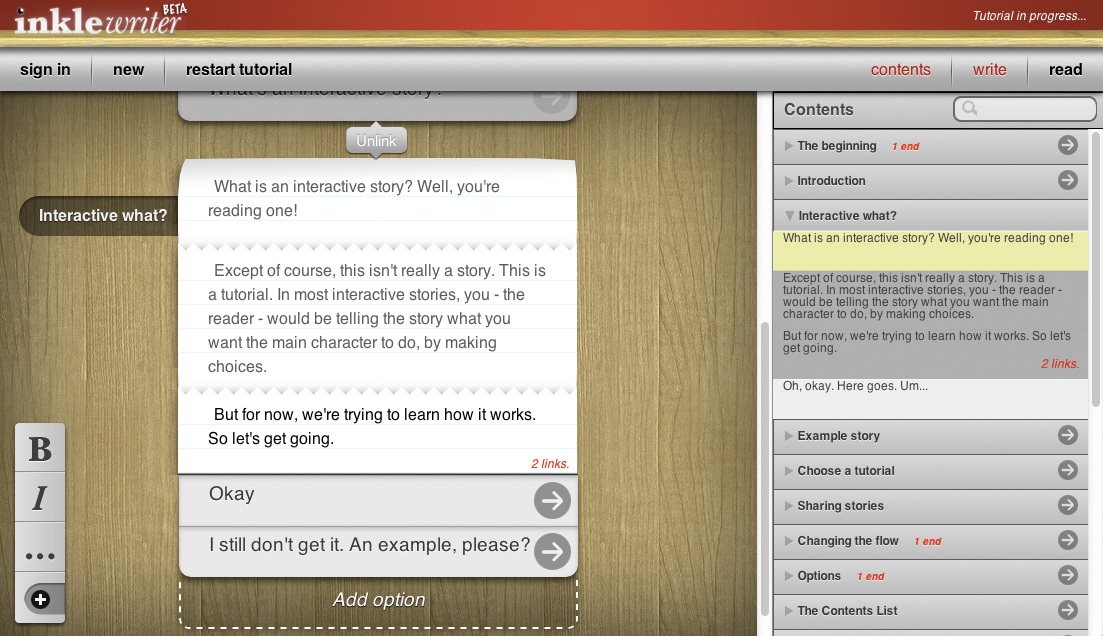
At inkle, we'd already shipped one visual code editor: inklewriter. And I'd been thinking about more visual approaches to ink, our narrative scripting language. Our core users are often writers first, not programmers per se - they want the technical features only in so far as they help them achieve their interactivity goals. I liked the idea of keeping ink's power while providing a more visual representation.
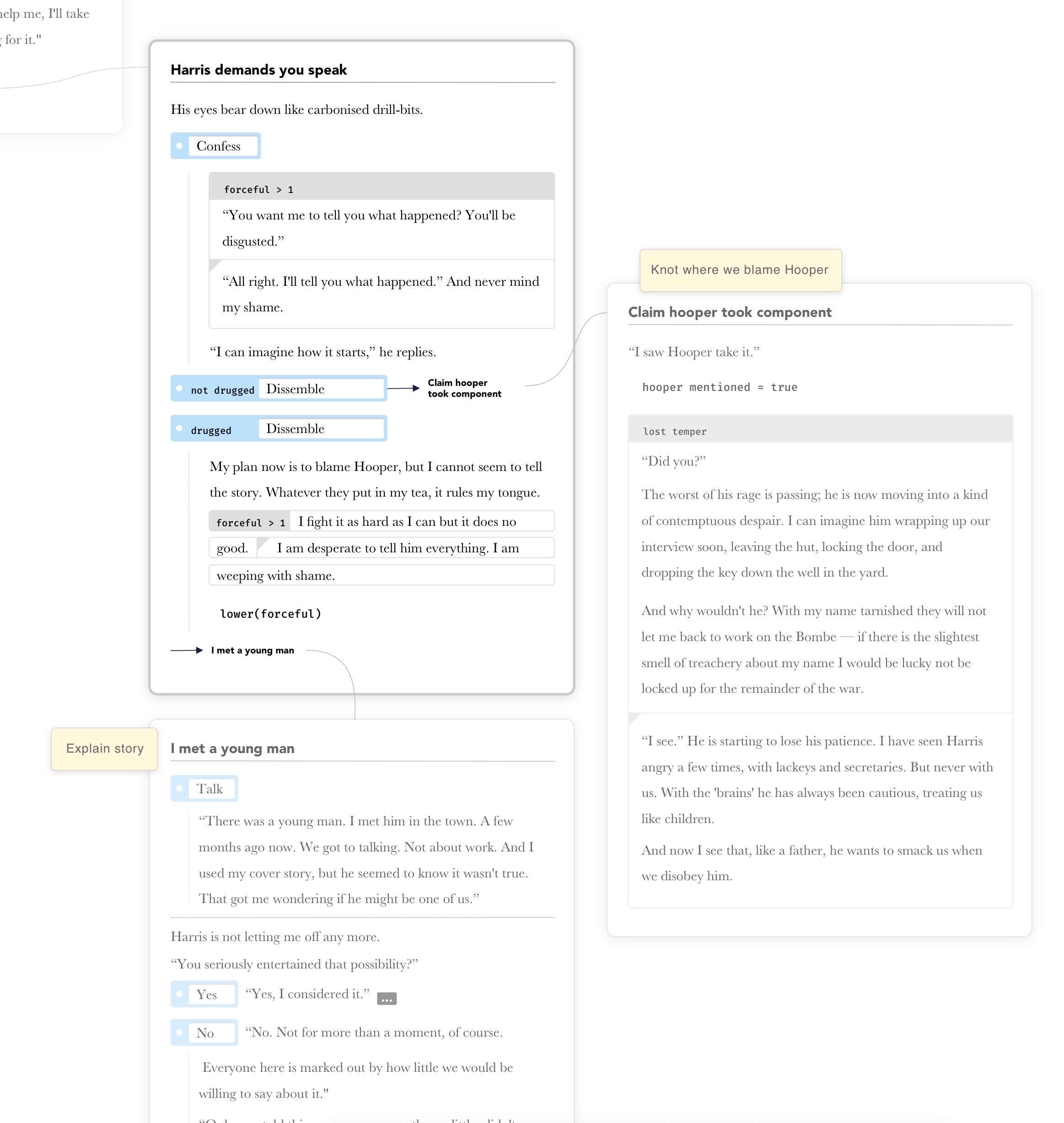
A mockup I made 5-10 years ago of what a more visual ink editor could look like.
I keep coming back to this dynamic 2D code layout idea!
But I always liked the denseness of something more like what (the now defunct?) Dion Systems were doing. Allen Webster and Ryan Fleury were asking the question: what if code's underlying representation wasn't text? Their code still looks like text - it's laid out as if it's indented text - but internally it's... not. In technical terms the internal model is an Abstract Syntax Tree - a hierarchy of objects. The whitespace doesn't exist, the code is simply positioned according to its structure. The idea of tabs vs spaces doesn't exist; you can use a slider to set indentation however you like. Curly braces don't exist, they're just a visualisation; they could've equally chosen to draw rectangles around blocks of code. Renaming a variable literally happens in one place even though it may be seen in multiple. This allows a huge amount of power.
So: does code really have to be pure text with fun colours and refactoring tools as a layer on top?
My quick prototype
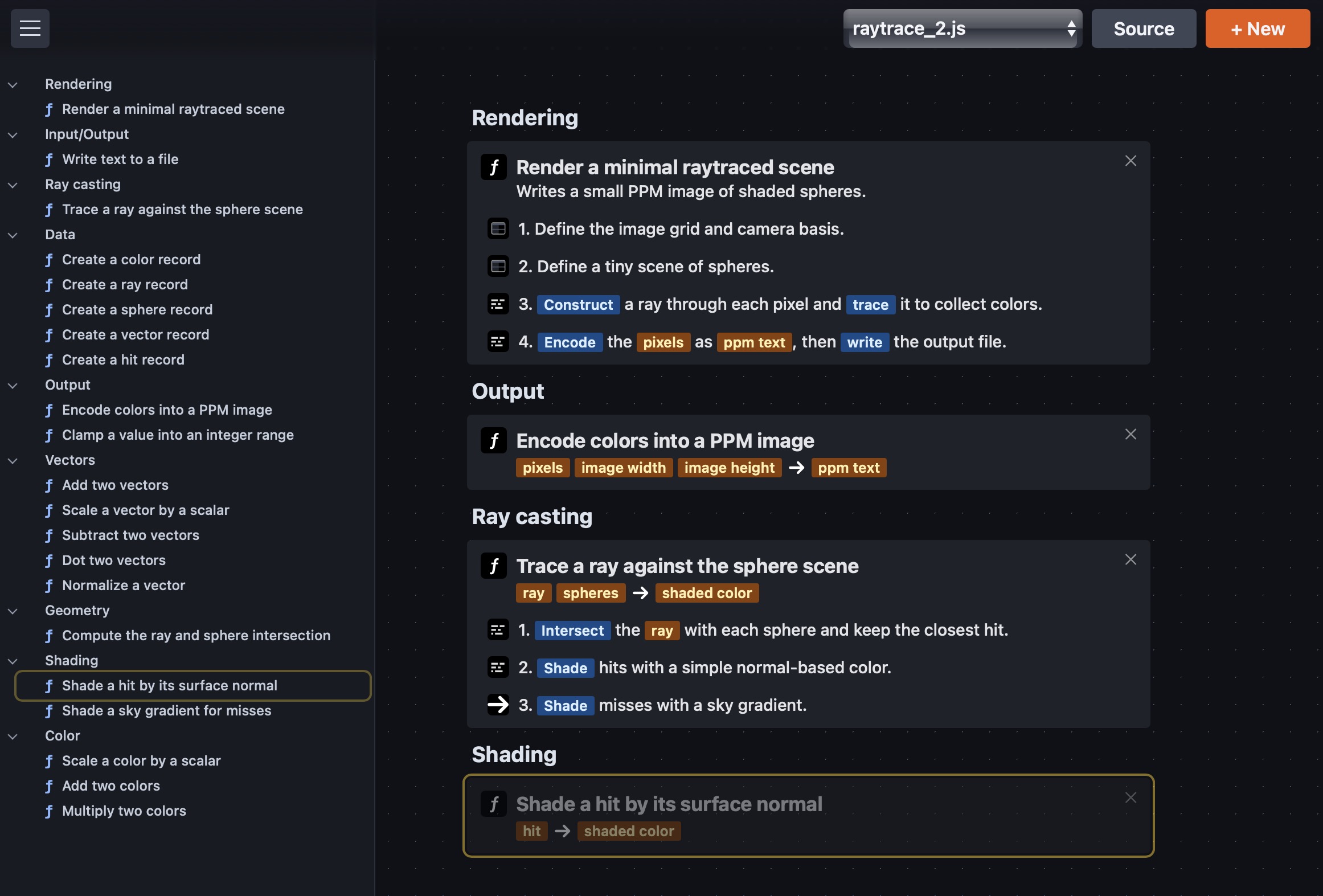
I've had this confluence of ideas brewing for a long time, so I decided to take a little stab at a prototype, with these aims:
Natural language first. The first thing you see is English, not code. Functions are named in English - "Add two vectors," not addTwoVectors. If you like, think of it as snake_case with the underscores removed, nicer capitalisation, and perhaps the odd (in)definite article. This has strong ties with Literate Programming: the idea that the English explanation is primary, structured to be read and understood by a human first, and compiled by a computer second.
An infinite canvas, not files. Instead of code split across text files, it's a structured bag of objects with references between them, explored freely on a 2D canvas - like Sketch, Figma or Apple's Freeform. The code itself is presented more like the UI from a pro tool - Final Cut, Unity, Godot, Photoshop. It uses a lot of text, but it's not a text document at heart.
Spatial presentation. Code is often thought about in terms of a top-down hierarchy: who calls who and who owns what. I don't know about other programmers, but I think about this spatially. In my usual IDE, I arrange the files I have open so that the tabs for important high-level controllers are on the left and smaller lower-level code progressively to the right. Similarly, I've noticed different programmers have different approaches within individual files, with functions and call order often roughly going top to bottom or vice versa.
My prototype makes this spatial thinking explicit. All functions are listed by code area on the left. On the main canvas, you start with the entry point. From there you spelunk through the code, exploring it top-down. As you read and understand what a function does, the functions it calls are brought in nearby. I've been experimenting with options to put them to the sides or underneath. Functions that call it are above. Perhaps you should be able to pin and drag these pieces around to match how you're thinking about them. Perhaps the editor should remember your spatial arrangement, or perhaps it should be fully dynamic.
Progressive disclosure. You don't see traditional "actual code" by default. Functions show their English descriptions. Expand one and you see step-by-step explanations, that can be further expanded. Functions that are called appear as linked pills. Hover a pill to preview it on the canvas; click to open it permanently. You can open and close functions a bit like tabs.
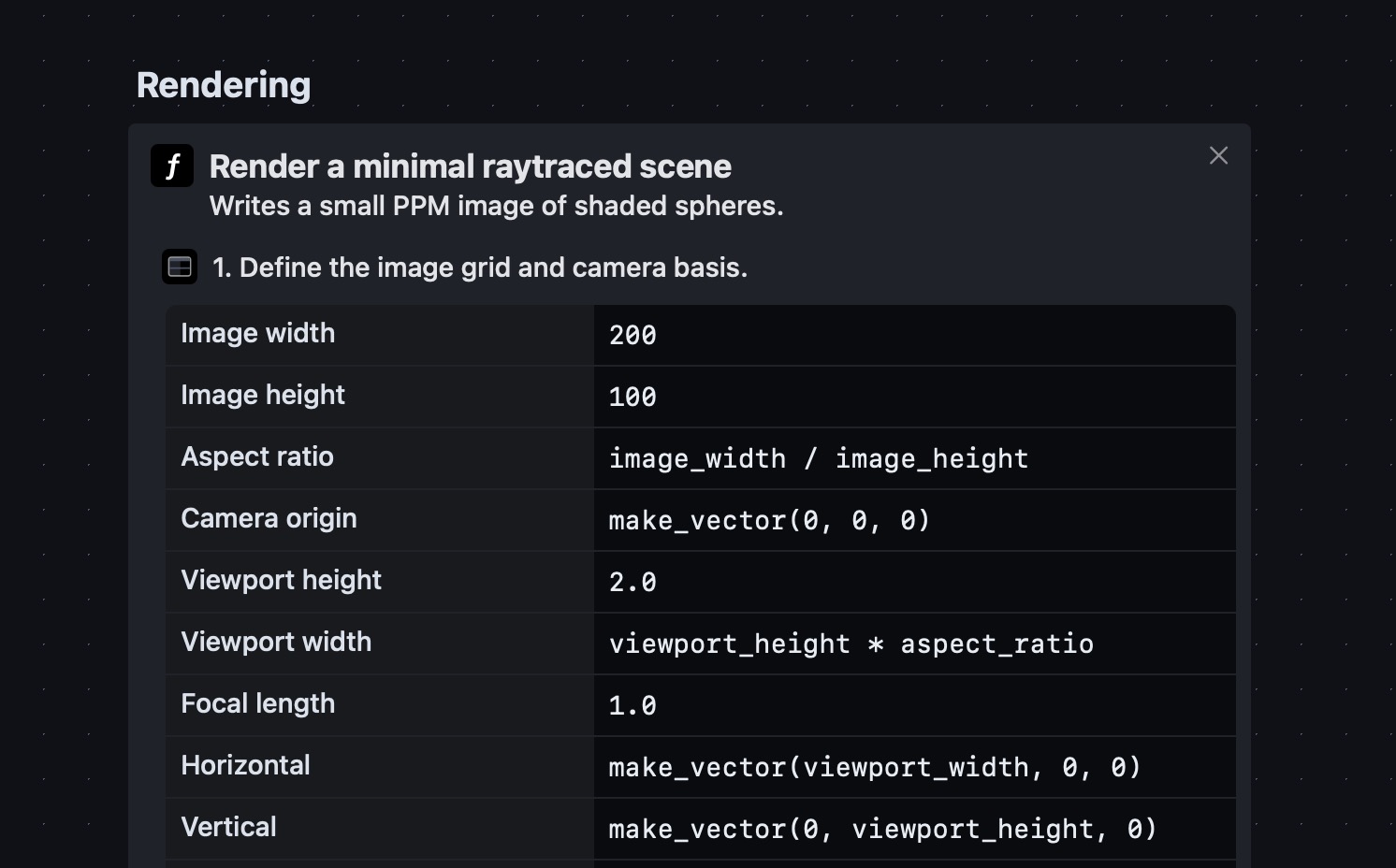
At the deepest level, you can see lower-level code - ideally presented in an elegantly terse block-based structure. If you want to edit by hand, it should be easy with keyboard input and good shortcuts, unlike Scratch or Shortcuts. But I'd expect the most common way to make small edits is to select some code and use a short AI prompt to tweak, rearrange or refactor it.
Mockup of how visual programming blocks look at code level (no base layer JavaScript)
Under the hood. The prototype wraps JavaScript, which is the actual code underneath. It's hackable, easily authored by an LLM, and great for prototyping in a browser. But the specific underlying language isn't fundamental to the idea. Internally, the English wording is written as comments within the JavaScript, then presented as the primary thing, with the code hidden unless you expand far enough. The JavaScript necessarily still has true function and variable names, used as unique identifiers internally. I'd like to aim for these "true symbol names" to never be necessary for a human reader, though that might not be possible for ambiguity reasons?
LLM generation. For generating new programs, you prompt the LLM (currently GPT-5.2 Codex). It writes JavaScript, and my system prompt tells it how to structure the code with a specific comment format. I ask it to link references to other functions using markdown-style links, such as // Now, [Parse](parse_text) the [raw text](raw_text).
Currently, the only visual representation beyond the English descriptions is a table of values for blocks of let definitions - which works nicely for things like defining 3D objects in a raytraced scene, a bit like an inspector in Unity or Blender. But I'd imagine different view styles for different code structures and flow control types.
Where it stands
Right now, you can only browse - you can't edit existing code. The function linking via markdown-style links adds ambiguity: it's not always 100% clear whether a link refers to a specific function, so you have to hover to check. I think this is probably solvable, but it's not great yet. There's a lot of work in figuring out how language features map to visual building blocks, and I'd only call it a success if the visual style is actually as clear to a programmer as traditional code - like for like, assuming both notations were new to them.
I'm also not sure how best to make use of an infinite canvas layout. Currently, code blocks just fill down vertically. I'd love it if the user could drag and rearrange things to match their intuition, and save that layout. Even better: when generating code, the LLM or the system could figure out how to lay things out in 2D in a way that actively helps you understand the structure.
I'm genuinely curious: do other programmers think about their code spatially, or is that just me and my graphic design background leaking through? Either way, I do wonder whether we'll really be using plain text files forever. I'd love to hear what you think (see my socials below).